
Vue Smart Glasses
All Products
Eyeglasses
Sunglasses
Accessories
Vue Lite 3
How It Works
Lenses
Vue App
FSA, HSA & Insurance
About
Contact
Explore Top Picks Find a Store
0%

Audio Eyeglasses with Microphone combine everyday frames with speakers and call controls, but their designs can differ sharply. In 2026, shoppers may find open-ear audio, voice assistants, and hands-free calling in one lightweight-looking pair. The details matter. Frame fit, microphone clarity, battery life, and sound leakage can shape daily comfort more than a long feature list. A useful comparison should examine these points alongside prescription options, app support, durability, and price.

Real use is rarely as tidy as a product page suggests. Wind near a bus stop can affect calls, while a snug frame may feel uncomfortable after several hours. Tiny controls can also be awkward when you are walking or wearing gloves. Check independent tests and current manufacturer specifications, since models and software may change during the year. Look for clear details about microphone performance, charging time, supported phones, and return policies. Claims such as “all-day battery” deserve context: listening volume and call time can change results. No single pair fits everyone. This guide will compare practical strengths and trade-offs, helping you identify glasses suited to commuting, work calls, or casual listening. Some comparisons still depend on limited testing, so we will note where evidence is unclear rather than treat every feature as proven.
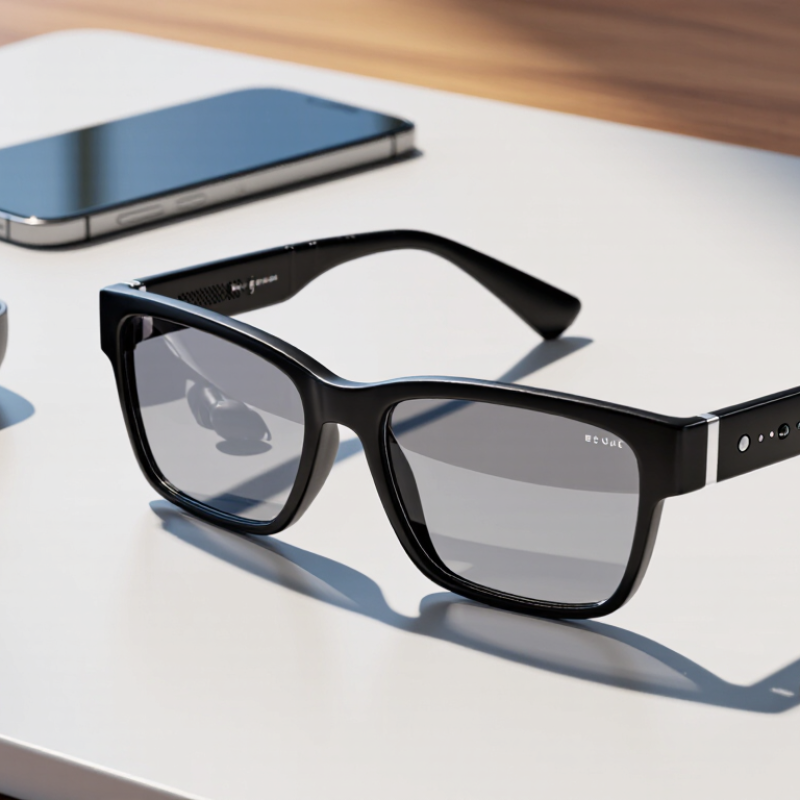
What Are the Best Audio Eyeglasses with Microphone in 2026?

How Audio Eyeglasses Combine Speakers and Microphones

Audio eyeglasses combine small speakers in the temples with microphones near the hinges or frame front. The speakers direct sound toward the ears, leaving them open to nearby sounds. Microphones capture calls and voice commands; signal processing can reduce steady background noise. Results depend on mic placement, wind, and how the frames fit. Bluetooth SIG’s 2024 Market Update forecasts 1.8 billion annual Bluetooth audio-streaming device shipments by 2028. That figure signals broad demand for wireless audio, not proof that every pair of glasses delivers clear calls.

Tips: Check the fit. Make a short call beside a fan, then outdoors. Listen for muffled speech and wind noise.

A good microphone should keep your voice clear without making you shout. Try speaking at a normal volume while walking, since movement can change how the frame sits. Also test the controls with one hand; tiny touch areas can be fiddly. Specs rarely describe the full experience. Even a promising noise-reduction claim may disappoint in gusty streets. Reading independent test results and checking return terms can help you judge a pair beyond its advertised features.

Key Features for Evaluating Audio Eyeglasses

What Are the Best Audio Eyeglasses with Microphone in 2026?

Microphone quality matters more than a long feature list. Check whether your voice stays clear beside traffic, in a breezy park, and during a quiet indoor call. Look for multiple microphones and noise reduction, but treat those terms as starting points, not proof. Bluetooth SIG’s 2024 Market Update forecasts 1.4 billion annual Bluetooth audio-streaming device shipments by 2028. That broad forecast signals growing demand for wireless audio; it does not measure smart-glasses call quality. Specs can mislead.

Test fit and controls, too. Frames should sit securely without pressing behind your ears, even after an hour. Try answering a call while walking, then listen for wind rumble and clipped words. Check whether touch controls work with damp fingers, and whether the glasses reconnect reliably after leaving your phone nearby. Battery claims matter less than call time at your usual volume. Small speakers also leak sound in quiet rooms, so consider who might hear your audio. One awkward truth: the best microphone can still struggle when the frame shifts. Compare practical call samples, not just advertised features.

What Are the Best Audio Eyeglasses with Microphone in 2026? - Key Features for Evaluating Audio Eyeglasses

Feature What to Check How to Evaluate It Why It Matters
Microphone system Microphone count, placement, and whether the glasses use noise-reduction or beamforming processing. Make test calls indoors and outdoors. Check that speech remains clear while background noise is present; microphone count alone does not guarantee call quality. Microphone performance affects how clearly callers hear you, especially around traffic, wind, or crowds.
Bluetooth calling support Support for the Bluetooth Hands-Free Profile (HFP) for calls and the Advanced Audio Distribution Profile (A2DP) for media playback. Confirm the supported profiles in the specifications and test calls, music, and switching between them with your phone. These profiles serve different Bluetooth audio functions; advertised Bluetooth version alone does not confirm calling or media compatibility.
Call control On-frame controls for answering, ending, or muting calls, and access to a phone’s voice assistant where supported. Try the controls while wearing the glasses and check whether they are easy to use without accidentally changing the fit. Convenient controls make hands-free use more practical and reduce the need to reach for a phone.
Battery life and charging Published talk-time and playback-time figures, charging method, and whether the battery is replaceable. Compare like with like: talk time and music playback are different use cases. Look for independent tests and note that volume, calls, and connection conditions affect runtime. A stated battery figure is useful only when the test conditions match your expected use.
Fit and wearing comfort Frame weight, temple pressure, nose-pad fit, and compatibility with prescription lenses if needed. Wear the glasses for an extended period if possible. Check that the frame stays secure and does not press uncomfortably behind the ears or on the nose. Audio glasses need to remain comfortable as ordinary eyewear, not just during a short demonstration.
Audio privacy and leakage How audible the speakers are to nearby people, particularly at higher listening levels. Test at a comfortable volume in a quiet room and ask someone nearby whether they can hear the content clearly. Open-ear speakers do not seal the ear, so some sound leakage and reduced privacy can be expected.
Water and dust protection The exact IP rating, if one is provided, and the manufacturer’s care instructions. Check the full rating rather than relying on terms such as “water resistant.” An IPX4 rating indicates protection against splashing water, not immersion. A defined rating helps set realistic expectations for sweat, rain, and cleaning; protection varies by product.
Phone and app compatibility Supported operating systems, required companion app, firmware updates, and access to settings or controls. Verify compatibility with your phone’s current operating system and check whether essential functions work without the app. Compatibility affects setup, customization, updates, and everyday reliability.
Durability and repairability Warranty terms, availability of replacement parts, lens replacement options, and repair or service support. Review the written warranty and confirm whether lenses, nose pads, or other wear parts can be replaced. Repair options can extend the useful life of electronics integrated into an everyday frame.

Evaluation note: Specifications and performance vary by model. Treat manufacturer battery figures as estimates unless the test conditions are stated, and verify call quality and fit in person when possible.

Best Audio Eyeglasses with Microphones in 2026

Audio eyeglasses with microphones are most useful when calls fit naturally into your day. A clear microphone should pick up your voice without forcing you to speak loudly. Test it near a window or on a quiet street, not only in a silent room. Wind and traffic can change call quality quickly.

For everyday wear, comfort matters as much as sound. Frames should sit securely without pressing behind your ears, especially during longer calls. Check whether the controls are easy to find by touch, and whether the glasses connect reliably after being stored overnight. Small speakers can make voices clear, but they usually cannot match the depth or privacy of headphones. Others nearby may hear some audio.

Battery life varies with call time, volume, and listening habits, so compare practical use rather than a single advertised figure. Look for simple charging and a microphone that does not become muffled when you turn your head. A short return window can help you assess fit and call performance at home. I would not assume the most feature-rich pair is the best; some controls still feel awkward, and microphone results can disappoint in a busy café. Try real calls before relying on them for work.

What Are the Best Audio Eyeglasses with Microphones in 2026?

A useful microphone benchmark is the range of voice frequencies supported during Bluetooth calls. Wider bandwidth can preserve more speech detail, but actual performance also depends on the glasses’ microphones, fit, and noise processing.

Typical speech-audio ranges: narrowband, approximately 300–3,400 Hz; wideband, approximately 50–7,000 Hz. These are audio-format benchmarks, not measured results for any particular pair of audio eyeglasses. Check independent call-quality tests before choosing.

How Leading Models Compare in Calls, Comfort, and Battery Life

Audio eyeglasses in 2026 are easiest to compare during real calls, not showroom demos. Listen for clear speech when traffic passes or a fan hums nearby. Models with well-positioned microphones and effective wind filtering usually keep voices easier to understand, though no open-ear design blocks every sound. Ask someone to make a short test call from a noisy street. Small details matter.

Comfort and battery life depend on how you wear them. A light frame may feel fine for ten minutes but press behind the ears after an afternoon. Check whether the arms sit securely without pinching, and whether the lenses suit your everyday needs. Battery claims can be optimistic: calls, volume, and music playback all affect runtime. Compare independent tests using similar conditions, rather than relying on one headline number. This part is easy to overlook.

Tips: Try a 15-minute call, then check for pressure and voice dropouts. Lowering volume can help extend battery life. If calls sound muffled outdoors, microphone placement may matter more than extra features. I would not assume the most polished demo reflects daily use; fit and call quality vary between people.

How to Choose Audio Eyeglasses for Your Needs

Choosing audio eyeglasses starts with how you plan to use them. For calls during a commute, check that the microphone captures your voice without making you speak loudly. For desk work, comfort over several hours may matter more than extra features. Fit matters. Frames that slide when you look down can make touch controls frustrating.

Look for clear microphone placement, simple controls, and compatibility with your phone or computer. Read independent reviews that describe call quality in quiet rooms and noisy streets; a polished product description cannot tell you how your voice will sound outdoors. Try a call. Ask someone whether your speech sounds muffled or distant. Also check battery life against your routine, not just a claimed maximum, since calls and music may drain it faster.

Consider sound leakage and how much surrounding noise you can still hear. Open-ear designs can help you notice nearby activity, but they may be harder to hear in a busy café. That trade-off is real. If possible, try the glasses before buying, and wear them for more than a few minutes. A small pressure point near the temples can become distracting by lunchtime. Reviews can help, but fit is personal, and even careful research cannot fully predict it.

FAQS

How do audio eyeglasses pick up your voice?

Small microphones sit near the hinges or front of the frame. Their placement affects call clarity.

Can they keep calls clear outdoors?

Sometimes, but wind and traffic can make speech muffled. Try a short call outside.

Do open-ear speakers keep audio private?

Not completely. Nearby people may hear some sound, especially at higher volumes.

How can I test microphone quality?

Call beside a fan, then walk outdoors at a normal speaking volume. Ask the other person about muffling or dropouts.

What should I check for comfort?

Wear the frames for about 15 minutes. Notice pressure behind your ears and whether the arms feel secure.

Does battery life match the advertised figure?

Not always. Calls, volume, and music affect runtime, so compare tests made under similar conditions.

Are the touch controls easy to use?

They can be fiddly. Test them with one hand before relying on them during a walk.

Are audio eyeglasses a good choice for work calls?

They may suit short, casual calls, but noisy cafés can be difficult. I would test real calls before depending on them.

Conclusion

Audio Eyeglasses with Microphone combine discreet speakers built into the frames with microphones that capture your voice for calls and voice commands. This guide explains how these components work together and what to consider when comparing models, including call clarity, speaker quality, comfort, fit, battery life, connectivity, and ease of use. It also highlights why microphone performance can vary in noisy surroundings and why a lightweight, well-fitting design matters for everyday wear.

The 2026 overview compares leading types of audio glasses across calls, comfort, and battery life, helping readers understand the trade-offs between features and daily practicality. Whether you want hands-free conversations, convenient audio while on the move, or a simple listening option that leaves your ears open, the guide offers a clear way to match your priorities, routine, and budget to the right pair.

Amelia

Amelia

Amelia is a professional marketing specialist dedicated to helping businesses understand products, markets, and customer needs more clearly. With a strong command of the company’s product portfolio, industry trends, and practical applications, she creates informative and engaging content that......