
In 2026, Smart Driving Navigation Glasses promise to place turn-by-turn guidance closer to a driver’s natural line of sight. A small arrow above the dashboard can feel less intrusive than glancing down at a phone. But a neat display does not automatically make a safer journey.
The scale of the issue is real. The U.S. National Highway Traffic Safety Administration reported 3,308 deaths in distraction-affected traffic crashes in 2022. That figure does not measure glasses, but it sets a serious standard for evaluating any in-car interface. Cognitive scientist David Strayer, a University of Utah researcher known for studying driver attention, has stated: “The brain is not capable of doing two things at once.” His work offers a useful caution: visual prompts still compete for attention, even when they appear near the road.
For market context, Grand View Research estimated the global smart-glasses market at about $1.93 billion in 2024 and projected continued growth. That broad category includes many products, not just driving navigation glasses. Forecasts are not proof of effectiveness. The best 2026 models should therefore be judged on more than bright optics or quick pairing: route clarity, stable positioning, glance time, voice control, and how easily guidance can be silenced matter on an actual drive. A sharp arrow helps. A cluttered one may not. We still need more independent, real-world testing before confident safety claims are warranted.
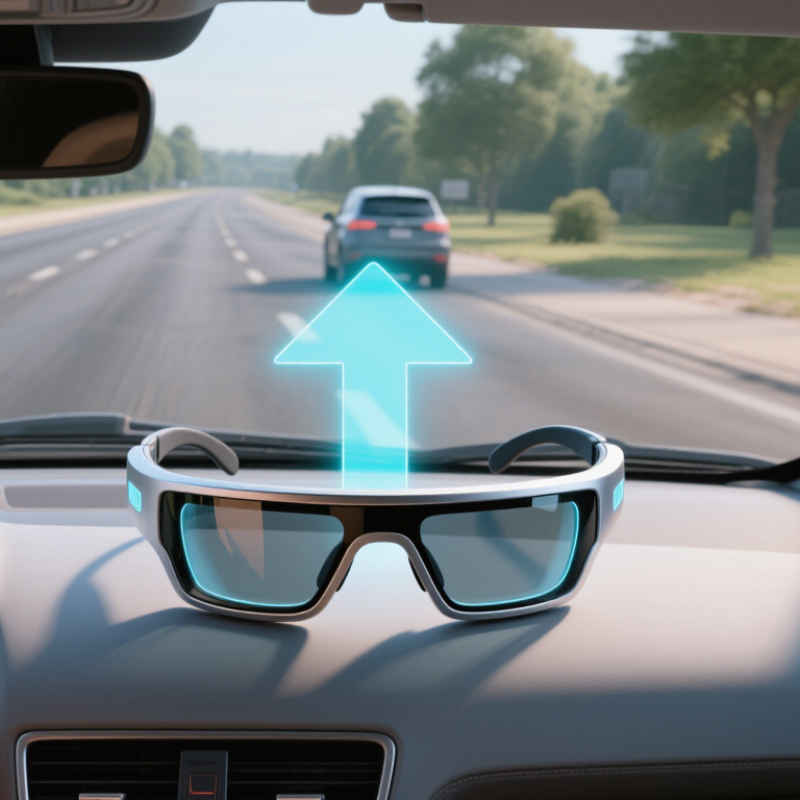
Driving navigation glasses are eyewear that places route cues in a small heads-up display, or HUD, within the wearer’s view. Instead of looking down at a dashboard screen, a driver may see a turn arrow, distance, or simple speed-related information near the road. The display should stay restrained. A bright map covering the view is not helpful.
GPS provides location and route guidance, while a connected phone commonly supplies maps, traffic updates, and destination details. Some glasses show only basic prompts; others offer spoken directions or call alerts. Check how the glasses pair, what information appears, and whether key functions still work when the phone signal drops. That distinction matters.
For a practical assessment, set a route before moving and test the display in daylight, shade, and at night. Can you read the next turn without shifting your gaze for long? Can you mute alerts easily? Tiny arrows can be hard to interpret. Not magic. Glasses do not replace mirrors, road signs, or attention to traffic, and drivers should not adjust a phone while moving. Specs also vary, so compare battery life, fit, display visibility, and phone compatibility rather than relying on a “top” label alone. A little awkwardness may remain. It deserves honest consideration.
Choosing among 2026 smart driving navigation glasses starts with the display. Compare brightness, text size, and how clearly arrows sit within your view. A bright overlay can help in daylight, but oversized graphics may distract on busy streets. Check whether directions remain readable without blocking signs or pedestrians. Small details matter.
Weight affects comfort more than a quick shop-floor test suggests. A few extra grams can press on the nose during a long commute, especially with prescription lenses. Battery claims also need context: navigation, screen brightness, and wireless connections can all shorten runtime. Look for test conditions, not just a headline number. Real use varies.
Route features deserve a close read. Turn-by-turn arrows, lane guidance, and rerouting can be useful when they are timely and easy to understand. Offline maps may help where signal coverage drops, though map updates and storage limits differ. Compare each model’s stated battery life during active navigation, then consider whether its charging method fits your routine. I would not treat a longer spec-sheet estimate as a guaranteed full-day result. That assumption can disappoint.
Smart driving navigation glasses should be assessed by how they affect attention, not by how futuristic they look. NHTSA’s two-second guideline is a useful benchmark: individual glances toward an in-vehicle task should generally last no more than two seconds. It is not a guarantee that a glance is safe, or permission to look away repeatedly.
Check whether directions sit near the natural line of sight without covering a pedestrian, traffic signal, or turning vehicle. Then consider how quickly text appears, whether it jitters over bumps, and if sunlight washes it out. A small arrow can help. A crowded display can do the opposite. That matters.
Evaluate the glasses in a stationary simulation before any real-world use. Have someone record glance length and note missed cues; do not handle settings while moving. Audio prompts may reduce visual checks, but speech can still distract. I would also test an unfamiliar route, because a calm drive on a familiar street proves little. The two-second measure is useful, yet incomplete: it does not capture every moment when attention drifts. A device can pass a timing check and still feel distracting.
Comparison of smart-glasses display approaches, not a ranking of specific products. Glance-burden ratings are qualitative design assessments; actual performance depends on the device, setup, driver, and road conditions.
| Display approach | Typical navigation information | Qualitative glance burden | Assessment against the 2-second benchmark | Most suitable use | Important limitation |
|---|---|---|---|---|---|
| Minimal, near-eye turn cue | Next-turn arrow and distance, with few or no secondary details | Lower, if legible at a glance | Potentially easier to check briefly than a detailed map. Keep each glance under 2 seconds and return attention to the road. | Simple routes and familiar road environments | Small text, poor contrast, or a cue positioned outside the forward view may require a longer look. |
| Forward-view directional overlay | Direction cue aligned with the apparent roadway or upcoming turn | Low to moderate; depends on alignment and visual clutter | A cue near the forward line of sight may reduce the need to look down, but it does not guarantee a sub-2-second glance or eliminate distraction. | Clear routes where the next maneuver is easy to identify | Misplaced or competing graphics can obscure useful visual information or distract from hazards. |
| Compact map view | Map, route line, current position, and nearby turns | Moderate to high | Reading a map can take longer than checking a single cue. A driver should not continue viewing it if a glance approaches or exceeds 2 seconds. | Passenger review or route planning while parked | More information can increase visual search and time spent looking away from traffic. |
| Voice-led navigation with a brief visual cue | Spoken turn instructions supported by a simple visual confirmation | Lower potential visual burden | Audio can reduce the need to read directions, while brief visual checks should still follow the 2-second benchmark. | Drivers who can hear prompts clearly and prefer minimal on-screen detail | Audio alone may be hard to understand in noisy conditions; visual confirmation can still distract. |
| Notification-rich or interactive display | Navigation plus messages, controls, menus, or other alerts | Higher | Reading, selecting, or responding can draw attention away from driving. Avoid interaction while moving; a short glance is not a substitute for safe operation. | Use while parked, or by a passenger | Multiple prompts and interactive tasks can increase both individual and cumulative eyes-off-road time. |
Safety reference: NHTSA’s voluntary Visual-Manual Driver Distraction Guidelines use a 2-second maximum for an individual off-road glance and a 12-second maximum for total eyes-off-road time for a task. These are distraction-assessment recommendations, not a guarantee of safety or a product certification. Drivers should follow local laws, keep attention on the road, and set routes before driving.
Smart driving navigation glasses should be judged by how much attention they demand, not by how futuristic the display looks. NHTSA’s 2013 Visual-Manual Driver Distraction Guidelines use two useful benchmarks: a task should take no more than 12 seconds of cumulative eyes-off-road time, and no single glance should exceed 2 seconds. These are voluntary design guidelines, not a certification for glasses. Still, they offer a practical test for entering a destination, changing a route, or dismissing an alert. Small text and tiny touch controls can turn a quick adjustment into repeated glances.
The AAA Foundation’s 2017 infotainment study reported that drivers took an average of 40 seconds to program navigation in the tested vehicles. That figure describes task completion time, not 40 seconds of continuous eyes-off-road time. The distinction matters. A heads-up display may reduce downward looks, but it does not make visual-manual interaction harmless. A map that shifts near the edge of vision can also compete with the road. Not every “hands-free” feature feels effortless in real traffic.
Tips: Test a destination change while parked. Count glances, not just seconds. Check whether voice input works without touching the frame, and whether the display stays readable in bright daylight. If a route correction needs several taps, that is a design weakness—not a habit drivers should have to compensate for.
For 2026, my top pick is a phone-linked display with simple, glanceable turn arrows. It usually offers the widest map compatibility, but confirm support for your phone and navigation app before buying. Second is a model with onboard navigation; it can work with fewer phone features, though map updates and connectivity deserve close checking. Third is an audio-first option with minimal visual prompts. It may feel less immersive, but that is not automatically less distracting.
Comfort is practical, not cosmetic. Wear a sample for ten minutes: pressure at the temples, slipping over glasses, and blocked peripheral vision matter more than a sleek demo. My ranking is imperfect because fit varies by face shape. For availability, count a product only when a dated 2026 stock page and checkout are live, and the seller confirms delivery to your region. A launch announcement alone is not proof.
Safety sets the limit. The WHO’s Global Status Report on Road Safety 2023 estimates 1.19 million annual road deaths worldwide. NHTSA’s 2022 traffic safety data recorded 3,308 U.S. deaths involving distracted driving. These figures do not measure smart-glasses risk specifically, but they support choosing quiet alerts, brief cues, and easy controls. Check the view while seated, then follow local guidance and the device instructions. Don’t trust a flashy feature list.
Compare display brightness, text size, weight, battery life, and route features. Check whether arrows stay readable without covering signs or pedestrians.
Not necessarily. Brightness can help in daylight, but oversized graphics may distract on busy streets. Check visibility outdoors.
A few extra grams may press on your nose during a long commute. Try them with prescription lenses if you use them. A quick test may not reveal everything.
Treat them as estimates, not guarantees. Navigation, screen brightness, and wireless connections can shorten runtime. Real use varies.
Look for clear turn-by-turn arrows, lane guidance, and timely rerouting. Offline maps may help when signal coverage drops, but storage and update options differ.
NHTSA’s 2013 voluntary guidelines suggest no more than 12 seconds of cumulative eyes-off-road time, with no glance over 2 seconds. They are not a glasses certification.
A 2017 study reported an average of 40 seconds to program navigation in tested vehicles. That was task time, not 40 seconds of continuous eyes-off-road time.
Try one while parked. Count glances, not just seconds. Check voice input and daylight readability. Several taps for one correction may be a design weakness, though I might underestimate how distracting it feels in real traffic.
This guide explains how Smart Driving Navigation Glasses combine a heads-up display, GPS guidance, and phone connectivity to present route information while driving. It compares 2026 models across display clarity, weight, battery life, and navigation features, while emphasizing that specifications and availability should be verified before choosing a pair.
Safety is a central part of the comparison. The guide considers whether road-facing glances can stay within NHTSA’s two-second guideline and checks visual-manual interactions against its 12-second limit for cumulative eyes-off-road time. Final recommendations weigh phone compatibility, comfort for extended wear, useful route features, and confirmed 2026 availability, helping readers identify options that fit their needs without treating glasses as a substitute for attentive driving.